
UTF8 Page Encoding and what it does.
January 15, 2009
Hi,
Have you ever loaded up a web page and found funny looking symbols in your text where there should just be normal text? Take a look at this screen capture:
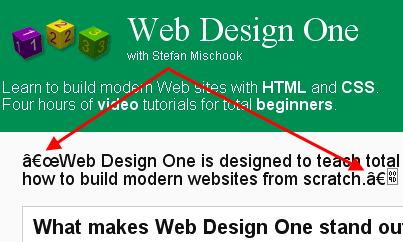
Those funky symbols are appearing because you are using symbols (in your web page) that fall outside the normal character space range … you need to tell your browser you want to use international symbols.
To do this, you need to add the UTF8 meta tag:
<meta http-equiv=”Content-Type” content=”text/html; charset=utf-8″>
And this is what you will get:

Hope that helps.
Stefan Mischook
www.killersites.com


