The boys and girls at Adobe recently released a public beta of Dreamweaver CS4 – and so now, I can freely talk about it!
I’ve been beta testing Dreamweaver CS4 for a little while now and I’ve been looking forward to spewing my nerd impressions. I had to hold my tongue until Adobe released DW CS4 to the public …
In this article, I provide a quick overview of what’s in CS4. But don’t worry, in soon to come articles and video tutorials, I will be digging deeper.
News:
Since I wrote this article, I’ve put out a few FREE Dreamweaver CS4 video tutorials that demonstrate some of Dreamweaver’s new capabilities. You can find them here:
–
My first impressions?
It’s pretty cool overall. Beyond the general improvements, there are a few really nice features that make Dreamweaver CS4 a worthy upgrade:
- Workspaces: expanded and now really easy to change the UI layout on the fly.
- Code Navigator: a new feature that makes it dead simple to dig into the code supporting your pages.
- Related Files: another new addition that gives you easy access to linked files associated with the document you are currently working on.
Each of the above features are so important that I will be creating a video tutorial for each of them.
A new look and feel
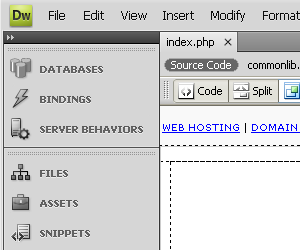
Dreamweaver CS4 introduces a whole new look and feel to Dreamweaver. CS4 now has the uniform Adobe UI called ‘OWL’ – OS Widget Library. The new user interface basically makes Dreamweaver look and act like the other Adobe software packages: Photoshop, Illustrator etc …
Deprecated / removed features
Dreamweaver is 10 years old and understandably, some of the things that made it into Dreamweaver turned out to not be so useful. So, Adobe made the smart decision (IMHO) to dump the crap so that they could concentrate and new stuff. From Adobe’s site:
Dreamweaver recently celebrated its 10th birthday with the Creative Suite 3 launch, and after a decade of development there are many features in the application that require significant resources to maintain release to release, but aren’t being used with significant frequency. Correspondingly, we’ve recently made some difficult decisions as a tradeoff between continuing to support infrequently used features vs. developing new features to both streamline key web design and development workflows and support newer technologies and development models.
So what did they remove?
* ASP.NET server behaviors and recordsets
* JSP server behaviors and recordsets
* Layout Mode
* Flash Elements
* Flash Buttons and Flash Text
* Site Map
* JavaBeans
* ASP.NET server behavior mechanism
* JSP server behavior mechanism
* Web Services Panel
* Timelines
… Makes sense to me.
Improved Ajax (Spry) and Javascript support
Adobe has got their collective ear to the ground and so they picked up on the fact that Ajax and Javascript are very important to web design these days – Web 2.0 anybody?
… Just in case you are relatively new to the web design world, just understand that Ajax and Javascript are the keys to all the fancy new web wizardry that you see on sites like Google Mail.

Dreamweaver CS4 has an expanded Ajax capability via their Spry framework and better Javascript editing support complete with more sophisticated code hinting. It’s pretty easy to create client-side Ajax enabled do-dads like form validation routines etc …
Conclusion
So far, I have to say that I like Dreamweaver CS4. The cool new features combined with the more flexible and versatile user interface, makes it easier (and maybe even a touch more fun) to build websites.
PS: did I mention that I have new videos coming out on Dreamweaver CS4?
🙂
Stefan Mischook
www.killersites.com
47 responses to “Dreamweaver CS4 Review”
[…] Read the complete review of Dreamweaver CS4. […]
I have to say that i like Dreamweaver CS4. The cool new features combined with the more flexible and versatile user interface, makes it easier to the websites.
Cannot wait for this to come out. I am going to go get the beta now. Thanks for your take on it.
We are looking forward to upgrading from CS3 to CS4.
I’m sold on dreamwever CS4… Thanks Stefan.
Hi Juice,
“I’m sold on dreamwever CS4… Thanks Stefan.”
… And I don’t even get a cut from Adobe!
🙂
BTW: if laziness doesn’t take over, I will be working on the Dreamweaver CS4 videos tonight.
… I have my shiny new mic to play with too!
Stefan
I’m not a DW user so I don’t know enough about some of the deprecated features, but I have to wonder what if infrequent use is the only motivation for removing the flash features listed.
What does DW CS4 have to offer that can not be done with a HTML editor with code completion (like Homesite)?
“What does DW CS4 have to offer that can not be done with a HTML editor with code completion (like Homesite)?”
Well, it depends on who the user is.
For a coder centric guy, they have the Homesite text editor built-in along with a lot of extra capabilities with regards to managing files:
– FTP
– synchronization
– check in and out capabilities etc …
There are also nice productivity enhancements like the:
– Code navigator
– Related files
– Workspaces
… and much more.
I will be releasing video tutorials on this today.
Stefan
What’s spry? and why is it good for me?
Camilo,
Spry is an Ajax framework (a bunch of Javascript) created by adobe. Spry will allow you to easily use Ajax to load data into your pages from outside sources like RSS feeds and PHP pages.
I hope to have video on this soon.
Stef
Wow, this looks very promising. I can’t wait for the final release. =)
The cs4 is a masterfull new release and it really does enhance web design. The most exciting thing about this is the code navigator that allows one to edit the code easily.
Wow, the code navigator does it for me! I’ve been using Dreamweaver for 8 years, now.
If the timelines have been deprecated, what has replaced them?
Hi Manu,
There will be no replacement. Anyway, that kind of stuff is best left to Flash.
Stefan
First off, using this: “Improved Ajax (Spry) and Javascript support” as explanation as to why Adobe made their decisions to remove the following:
* ASP.NET server behaviors and recordsets
* JSP server behaviors and recordsets
* Layout Mode
* Flash Elements
* Flash Buttons and Flash Text
* Site Map
* JavaBeans
* ASP.NET server behavior mechanism
* JSP server behavior mechanism
* Web Services Panel
* Timelines
is weak. Specifically, the removal of “ASP.NET server behavior mechanism”, “JSP server behavior mechanism”, “Web services panel”, “ASP.NET server behaviors and recordsets”, “JavaBeans” and “JSP server behaviors and recordsets” has automatically lost Adobe major markets. It is absurd for them to claim Dreamweaver CS4 is a developers software. Packages like Dreamweaver CS4 of suppose to be advanced UI Authoring environments either tailored to designers, developers or both. Dreamweaver CS3 (really DW8 with brand changes) supports true development (including PHP) as well as true CSS design and site management tools. The plugin architecture in Dreamweaver CS3 allows users to use what is best for them and allows plugin makers like WebAssist to create fine specialized products for professional developers. Dreamweaver CS4 is geared towards design more than development. Therefore, Adobe needs to be less like the banned, misleading Apple ads in UK and tell users the real deal behind it’s shady decision to dumb-down a once awesome package even Adobe couldn’t compete with before it bought Macromedia.
Could it be the competition from Microsoft amazing .NET platform? If so, that didn’t stop the once competitive Macromedia. As a matter of fact, Macromedia then proved to a be a potent, competitive alternative to Microsoft web development tools and gave developers other avenues to create fully featured, professional websites with great assistance from the authoring environment. Now Adobe as decided to trick users into thinking client side javascript, UI scripting and integration of plugin tool with copy and pasting images from Photoshop somehow equates and/or replaces the idea of development as in:
-ASP.NET server behaviors and recordsets
-JSP server behaviors and recordsets
-JavaBeans
-ASP.NET server behavior mechanism
-JSP server behavior mechanism
-Web Services Panel
Stefan Mischook, if Adobe’s decision to remove true development capability from the once awesome Dreamweaver made sense to you, shouldn’t be writing a review on major package like Dreamweaver with such narrow insight, which allowed you to erroneously justify Adobe’s almost criminal-like actions by saying:
“So, Adobe made the smart decision (IMHO) to dump the crap so that they could concentrate and new stuff.” – Stefan Mischook
And what is the new stuff? Copy and pasting images from Photoshop (which you can already do in the current Dreamweaver and previous versions), Integrated Spry component (which many developers have as plugins), new UI (which could’ve been built around true development capabilities enacted)?
Admit it, the Dreamweaver CS4 is hardly a designers wet dream and a developers nightmare. But like Apple’s broken model, if you can make rotten fish look nice, maybe people wouldn’t notice the smell. Nice going Adobe, but you aren’t fully the real smart people.
Hi,
I think the timelines was crap in Dreamweaver and as for support for ASP.net and JSP – I’m guessing these guys are using more specialized products typically used in their camps.
… I was one of the few JSP/Java guys I knew (the only one in fact) who used Dreamweaver at all. Most will use Eclipse or maybe IntelliJ IDEA. So the loss of support in those areas are probably not a major concern.
Nothing is perfect, but I like the new features. I’ve put out some videos on them here:
http://www.killersites.com/dreamweaver/
Thanks for the comments.
Stefan
Hi,
I cant find the SiteMap icon in CS4. Is there a replacement for it?
About the sitemap icon:
As I wrote in the article, the sitemap was removed from Dreamweaver CS4.
@masterDeveloper – (With such an important title like that why would you need Dreamweaver anyway..?)
Dreamweaver has done a good job of identifying the needs of their target market. They have eliminated much of the dead weight based on marketing results. I believe this is one of the biggest reasons Adobe aquired Macromedia in the first place. They have made DWCS4 even more compatible with the rest of the Adobe line, making it a better value for designers all around.
I give them credit for standing their ground even if some of the hard-core code heads complain and snipe at them for it. Most of them weren’t using Dreamweaver anyway.
I’ve listened to you programming types putting Dreamweaver down for years. There’s nothing Adobe could ever do to satisfy you people anyway. You’re just looking for a reason to flaunt your self perceived superiority and slam a good product that many of us who use a combination of design and development skills are very greatful for. Get over it. It wasn’t designed for you anyway. Rock On Dreamweaver!
I’m actually glad they dropped support for ASP.NET. It was misleading for them to say they supported it in the last release. They supported .NET 1.1, which was superceded by .NET 2.0 way before they ever released CS3.
I wonder how many people purchased Dreamweaver noting “ASP.NET support”, and ended up being VERY disapointed because you had to dig into the documentation to find out it only supported 1.1.
Luckily I did my reasearch before laying down any $$$ for this product.
I’m very disappointed in Adobe’s decision to remove ASP.NET and JSP support from future releases of Dreamweaver. Sure, you can use Visual Studio and Eclipse to do ASP and JSP work, respectively, but the point is to have one development tool that conveniently supports ALL of it.
Now that Adobe has made this decision, it means added cost for all many development houses hoping to consolidate their development environment into one useful software tool.
It’s curious that they continue to support PHP in this environment. Sounds more like a political (religious?) move to me.
…actually, Brian K Shoemake et al, Dreamweaver has its roots as a hard-core coders platform at a time when you left ‘design’ to another department. Anyone recall Allaire Homesites? Version 4 of Homesites came bundled with Dreamweaver 1.2 soon after Macromedia purchsed the development platform from Allaire. After version 5 of Homesites, the whole she-bang was incorporated into Dreamweaver 8 — hence all of us ‘hard-core’ individuals were migrated to DW — and all was good.
In a since I’ve been using Dreamweaver (including its predessor Homesites) for about 12 years now, and certainly this old goat agrees that the loss of JSP and .net support is somewhat of a diservice. Contribute was supposed to be the platform that designers would utilize, as a go between from hard code and pure design.
Unfortunately, in this vein I have to agree with the masterD up above. This Dreamweaver is rather watered down. Good thing I can ‘downgrade’ to CS3.
There is a question for me! I will be very glad if u answer me to my e-mail! If I wanna use TIMELIME icon in Dreamweaver CS4 Beta or no?! In my CIW class we use CS3 & I myself have CS4 version, some changes & whatever I’ve done I could not active the TIMELINE! So what to do?! Plz help me! 🙂
Hi Vesta,
You can’t find the timeline because it was removed from CS4.
Stef
I have been using dreamweaver MX but now find that I must find a web developer to design and develop a website for a nonprofit where I am a volunteer. I would like to find a medium sized company that uses CS4 as their development software. Also, I wanted to have some of the more recent Web 2.0 features and the ability to interact with salesforce.com. Any ideas?
Jim,
The Spry components that ship with Dreamweaver CS3 and CS4 are Web 2.0 based tools.
… Ajax stuff.
I’ve never used salesforce.com so I have no ideas there.
Stefan
No ASP.Net? Oh snap!
I’m a 10 year Dreamweaver user/lover. I don’t like Visual Studio even though I have to use it everyday for some clients.
I reluctantly moved from classic asp to .net in Dreamweaver. Did some big applications in Dreamweaver using .Net so they would not be outdated technology. I wish I hadn’t now.
So Adobe, does this mean ASP will be the future?
I would guess that Adobe just pulled data showing that ASP.net isn’t widely used in Dreamweaver … so they pulled support for it.
What can you do?
Stefan
So what functions in CS4 get the same use of timeline? Plz tell me in detail howw to use, thanks!!!!!!!!!!!!!!!!!!!!!!!!!!!!!!!!!!!!!!!!!!!!
where?
Hi,
You can find my new Dreamweaver CS4 videos here:
http://www.killersites.com/dreamweaver/dreamweaver-cs4-videos.php
Thanks,
Stefan
I have to agree with masterDeveloper and find myself in the same situation as SC Webmaster. After all the years (MM_crowd owes me a check for free support and promo I have done for DW :)) it feels as if it is good time to start porting snippets into alternative editors.
It is a shame but code view is all I really have left to appreciate from DW and for the price tag of $399 hardly can call this a ‘value’.
Even installing CS3 I just about fell asleep waiting for it to install.
Spry…big deal, bag full of code easily replaced with any other JS frameworks such as slick jquery.
View or related files…please, if you are not aware that you have external JS and CSS then you have bigger issues.
File management = here is a newsflash…how about calling them ‘folders’ 🙂
FTP – tons of free apps out there
Templates (.dwt) only relevant in DW world…nothing that SSI or simple ‘find & replace’ can’t do.
Need I go on about my sadness over ‘Adobe effect’ on this ones < v.4.0 app?
However, I do appreciate what DW has done over years for the community and non-designer-coders being able to quickly convey their ideas over the web. It is also a great learning tool for those who ARE interested into code being generated behind the scenes; unfortunately many web hobbyists are not. It still is a good tool and it CAN produce nice valid code if users take time to configure it correctly before jumping onto quick PSD-to-HTML approach. It still is a good tool when it comes to ‘rapid development’…but ‘rapid’ comes at the costs.
I think CS3 is where it stops for me and looking forward I am more likely to move over to something in the line of TopStyle,PSPad,NotePad++ or UltraEdit for a min. $ investment…which have always been my ‘backup/quick’ editors even with DW loaded on the machine.
Perhaps Adobe should consider making more versions of Dreamweaver…
one – fully loaded 1/2 of GB app for designers and novices while giving the second – ‘bare bones’ for coders so it doesn’t burn such a whole in its followers budgets and habits developed along with this application.
Stay strong my people of HTTP world…as someone said it better than I could:
“only fools admire tools”.
We developed JSP server extension package as a part of our commercial product to enable our clients quickly generate custom JSPs based on project’s dynamic data.
Now, when the support for this feature is dropped, we are stuck. We cannot advise our potential customers to procure older CS3 version in order to use our extensions.
What a letdown…
Hi Yuri,
I can see how that would be a major let down.
If it’s any consolation, Dreamweaver CS4’s adoption rate has not been stellar.
… I think there is still life in CS3.
Stefan
You make it sound easy….just bought the program and, for me, it’s way above my learning curve. Bought, “Dreamweaver CS4 for Dummies” hoping that I could figure out a way to get started….I have domain names for websites I want to create. Some have already seen the light of day on Blogspot and some, hopefully, I can develop without spending a ton of $$$. Is Wizard the solution for a simple site with more than 100 links or can you point me to a video that a “simpleton” can understand!
Hi,
This is just too easy … shameless even!
Check out my Dreamweaver CS4 videos:
http://www.killersites.com/dreamweaver/dreamweaver-cs4-videos.php
Check them out.
Stefan
I am looking for a new web designer program. I am looking for something simple that still gives you a professional look with a number of feature options. I currently use Kompozer but it doesn’t give me all the design options that I see on a lot of web sites. Can you tell me if Dreamweaver is easy enough to learn for someone that has made web pages but is not up on every different feature and doesn’t have all the latest tech knowledge?
Hi,
I would say Dreamweaver is easy enough to learn … especially with the help of my videos!
😉
http://www.killersites.com/dreamweaver/dreamweaver-cs3-videos.php
Stefan
I have been struggling with Dreamweaver CS4 links. In Windows Explorer some work and some go to codes. Could you tell me if I can find workarounds for this problem? Could I find ways of identifying and fixing bad codes? Could you suggest any book or resource which tells me about such pitfalls and the ways of getting out of them? Please send me an email at cyruspak@sbcglobal.net.
Many thanks,
Sigh
Hi Sigh,
This is a classic problem people new to web design discover: that using Dreamweaver does not solve for the lack of basic web design skills. In the end, it is still important you understand basic web design!
You solution is to learn HTML and CSS basics so that you can pop into Dreamweaver’s code view and make your changes. My beginners course will do the trick:
http://www.killersites.com/web-design/
Stefan
When I bought my macromedia MX academic version it was only a couple of dollars more than the academic Homesite. I never really learned the Dreamweaver, but now it is time to upgrade, and the upgrade is for TopStyle 4. It designed by the original Homesite inventor, is now a HTML editor very comfortable for Homesite users.
I’ve been playing with it for a couple of weeks, and I do not see any reason to upgrade the Dreamweaver. Maybe if I had used it a little more in the past, then maybe I might want it.
Any other TopStyle 4 fans out there?
I’d like to see a video on some of the new stuff on it.
I haven’t heard of TopStyle 4, so I have no comment. That said, I mainly use Dreamweaver’s text editing, FTP and file management tools.
… These days, the wysiwyg features are much less important because the technology behind web pages is much improved – I’m talking about HTML, CSS and the web browser themselves.
Stefan
WOW My Head is Spinning with Mixed Emotions after reading all of these reviews. Here is my deal I am currently using Dreamweaver MX (Yeah I know get with the times buddy) Anyways I had Dreamweaver MX and a book that teaches me it so I decided to learn it. I am a VB programer and I love the Easy of front end design that DW offers while still being able to also code back end database and logic for the sites I want to build.
I figured I should upgrade my WYSIWYG dev software because I really want to start getting into ASP.NET as that seems to be where it is at for any kind of advanced site that has any kind of backend coding logic and database. I am working towards building Flash based Web Browser Games (Advanced ones) and I was considering upgrading to CS4 but after finding out that CS4 has dropped ASP.NET I am wondering if I should consider leaving Dreamweaver and going to MS Visual Studio I am torn because I love the DW WYSIWYG Design Enviroment Because I am not one of them hardcore types who code there entire site in Notepad (Dorks) I think that is extreamly time consuming and why bother walking when you can drive right.
Anyhow I guess my question is Should I go with MS Visual Studio or Should I go with CS3(but CS3 only has support for ASP.NET 1.1) or should I go with CS4 and if I do go with CS4 does CS4 Would I have the ability to do my ASP.NET stuff in a different program like Visual Stuido and than the design part in CS4 and be able to combine the two halfs into a whole rich flash based web browser game site with ASP.NET as the back end ?
err so stressed over this cause I do want to use ASP.NET 2.0 and higher and CS4 but don’t know if there is a way to have both come together
Please help with some advice
Dan.
Hi,
A couple of points:
1. If you want to get into ASP.NET, then you want to go with Visual Studio or maybe Web Expression.
2. If you want to build Flash based front ends, you will have to fight a little with Microsoft products because they have a Flash competitor – Silverlight.
3. If you want to build Flash front ends and keep Dreamweaver, then go with PHP. Check it out: http://www.killerphp.com
Stefan
I don’t get it… why remove a feature and NOT replace it with an alternative….
“Site map & timelines ” 2 great features that none of the other competitors have.
Although timelines and site map features are turned off, you can turn them back on in Dreamweavers preferences. For timelines you may need to get a copy of the behavior/actions timelines folder from CS3:
Restore the timelines feature in DW CS5.
Go to your user folder > Library > Preferences
Open “Adobe Dreamweaver CS5 Prefs” in a Texteditor
Search for [FEATURE MANAGEMENT]
set timeline=TRUE
Put the timline folder from configuration of any version that has it (cs3 does) here:
/Users/YOURNAME/Library/Application\ Support/Adobe/Dreamweaver\ CS5/en_US/Configuration/Behaviors/Actions/
Restart Dreamweaver and you should have timelines again. Just add a selected div from the Modify:Timelines menu and the timelines window will appear.
Also, you can get the window toggle command back by editing your Menis.xml from:
/Users/YOURNAME/Library/Application\ Support/Adobe/Dreamweaver\ CS5/en_US/Configuration/Menus/Menus.xml
Add this:
BELOW this: