Firefox is the Web browser of choice for most web designer’s, because it is fast and it sticks to the Web standards better than say IE6 or IE7.
That said, Firefox has a bunch of other features that makes it attractive to Web professionals. One of the big ones for me, is the ability for anyone to add to Firefox’s core functionality by way of plugins.
Add-ons/Extensions
My only complaint about Firefox plugins is that the Firefox nerds don’t call them ‘plugins’! Instead they use the terms ‘add-ons’ and ‘extensions’. Besides that little issue, Firefox plug-ins turn this nimble Web browser into an important tool for Web designers.
My Favorite Web Designer Add-ons
The Firefox add-ons collection is growing continuously … and many are not just for Web designers too.
But, since this is killersites.com, we will look at my top three Web designer centric add-ons for Firefox:
- MeasureIt: a plug-in ruler for Firefox.
- ColorZilla: a plug-in for color picking.
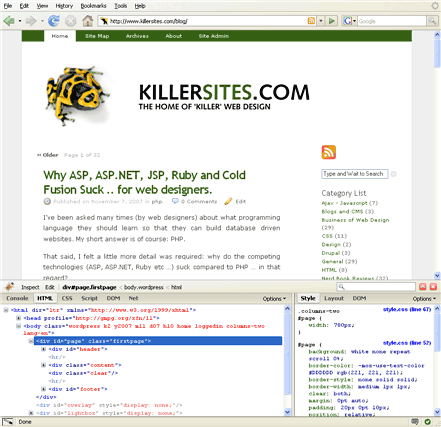
- Firebug: a plug-in for inspecting CSS and HTML code.
Firebug Screenshot - click to enlarge
To help make things as clear as possible, I’ve created a video tutorial that demonstrate and installation and use of these very useful web developer plug-ins.
Video Tutorial: Firefox Plug-ins Video Tutorial.
Thanks,
Stefan Mischook
www.killersites.com

I have collected enough data to build a website that you have been sending to my inbox and internet favorites. I am not too computer literate for doing my own site and still have not ‘built my own web site’. Why? Guess I just don’t get it. If one drops IE 6, etc. and picks up another internet server (whatever term that means), I would panic! What are the benfits of Firefox over other web designing techniques?
Using Firefox does not mean you are using another ‘web design technique’ - as you say.
Firefox is just another browser you can choose to use that has a few extra features that make it much more interesting than IE6, as far as a web designer is concerned.
Based on your email, it would seem to me that you need to go over a few basics of web design. You can find a walk-through tutorial here:
http://www.how-to-build-websites.com/
I hope the helps clarify the article and video,
Stefan Mischook
Stephen,
I’ve been learning from you for a long time, along with some college courses and a lot of seat time. You continue to expand my skill and giving the personal touch to the material without the hype that overruns so many sites.
Thanks so much
Elaine
I also use them 3 plug ins for Firefox. I particularly wouldn’t be without Firebug, it’s an absolute godsend.
Actually i m using web developer add-ons on firefox…..and it helps lot for designers who can easily work while conversion of designs into HTML.
I just love the Webdeveloper toolbar for Firefox. It really helps when trying to improve css code. Firebug is also a big help when experimenting with ajax
I definately recommend firebug…what an idiot I was for overlooking it. I always thought it was for “developers”. I thought it would be way too complex so I never bothered with it.
One day, about a month ago, I was bored and tried it…After 5 minutes of messing around with it I was able to solve a CSS spacing issue that rendered well in IE and Opera but not Firefox that was bugging me for about a month.